
Carve
待核實待核實
AI render studio turning sketches and CAD files into photorealistic visuals.
FreemiumFree Trial官網Paid
綜合評分
—(0 則評價)
carve.so/
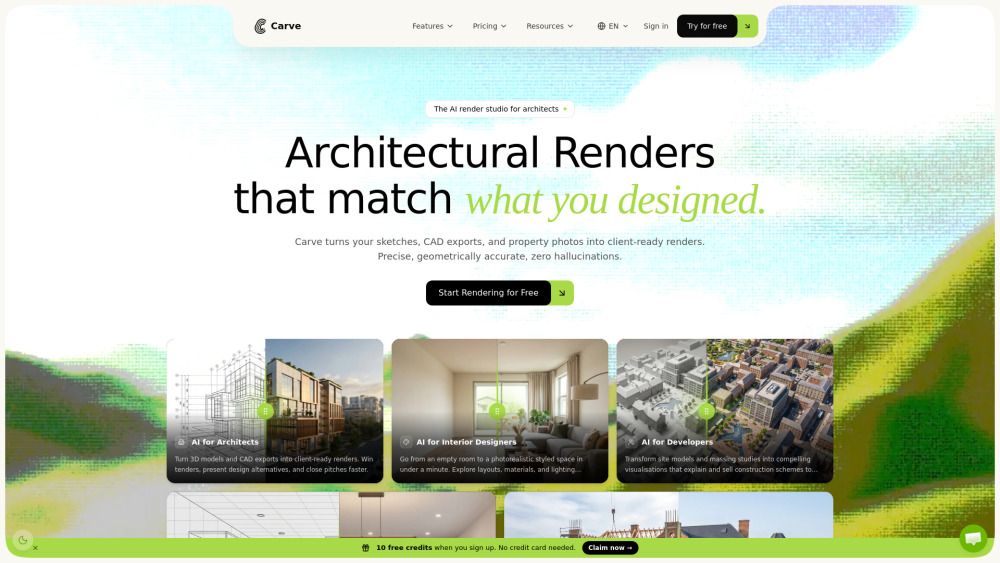
Carve 是什麼?
Carve is an AI-powered architectural rendering studio that converts sketches, CAD exports, and property photos into client-ready, photorealistic visualizations in under a minute. It is specifically designed for professionals across architecture, interior design, and real estate, allowing them to explore design variations, staging options, and cinematic animations instantly within their browser without requiring expensive rendering hardware or long studio turnaround times.
AI render studio turning sketches and CAD files into photorealistic visuals.
核心功能
AI Interior and Exterior Rendering with 49+ photorealistic styles
Sketch to Image generation with edge-preserving control
Virtual Staging AI to automatically furnish empty rooms
Animate AI with 20 motion presets for 5-second cinematic clips
Render Tree workflow for branching and following visual variations
Collaborative AI Canvas with version control and real-time presence
GDPR-compliant EU hosting with workspace-scoped isolation and no AI model training on user uploads
熱門使用情境
- Architects turning SketchUp, Revit, or Blender models into client-ready concept presentations
- Interior designers generating instant material, lighting, and layout options for clients
- Real estate agents creating quick virtual staging and promotional imagery for property listings
- Developers creating site model and massing study visualizations to pitch to investors
- Kitchen builders and carpenters rendering bespoke designs to justify premium pricing
功能比較
基於工具方提供的資訊進行功能比較。
待核實
比較資訊僅供參考,請以官方網站的最新資訊為準。
如何使用
- To use Carve
- upload an image file such as a hand sketch
- CAD export (converted to an image)
- or property photo. Select your desired tool and style
- then let Carve's diffusion engine process the design into a photorealistic render in under 60 seconds. You can then branch out designs using the render tree
- edit specific areas
- or generate cinematic motion clips.
定價
Carve 採用 Freemium 定價模式,價格與功能可能隨時間調整。
Free to try
Free
10 free credits when you sign up, usable on any tool (renders, edits, animations, upscales). No credit card required.
Starter
$29 /month
150 credits per month, all interior + exterior styles, render, edit & animate included, 4K resolution output, text-prompt & area edits, full history & version tree, standard queue, live chat support.
Pro
$49 /month
600 credits per month, priority generation queue, shareable gallery links, upscale up to 8K, priority live chat support, and all Starter features.
Agency
$99 /month
1500 credits per month, unlimited team seats + workspaces, brand presets, dedicated Slack / live chat support, and all Pro features.
Top-up 25 credits
$7
One-time purchase of 25 credits ($0.28 per credit). Credits roll forward indefinitely.
Top-up Boost 100 credits
$19
One-time purchase of 100 credits ($0.19 per credit). Credits roll forward indefinitely.
Top-up Bulk 500 credits
$79
One-time purchase of 500 credits ($0.16 per credit). Credits roll forward indefinitely.
優惠 / 優惠碼
目前沒有優惠碼。
大家喜歡它的原因
目前還沒有評價標籤。
還有哪些可以改進
目前還沒有評價標籤。
常見問題
驗證資訊
工具狀態
待核實
定價已核驗
待核實
創辦人已認領
否 / 待核實
來源
官網 / 社群提交
相關標籤
AI WritingContent GenerationResearchEmail WritingSummarizationRewritingAcademic Research瀏覽器擴充功能Freemium
你是這個工具的官方團隊嗎?
認領這個資料頁後,你可以更新產品資訊、定價與官方回覆。
