
Youtube Transcription
To be verifiedYouTube Transcription ai chrome extension? YouTube Transcription is a feature that automatically transcribes the audio of YouTube videos into text. This allows users to read the content of a video, making it accessible to those who are deaf or hard of hearing, or who prefer to read along with the video. It also enables users to easily search for specific keywords or phrases within a video, making it a valuable tool for research and information retrieval.
Automatically transcribes YouTube video audio into text for accessibility and search.
Browser ExtensionFreeWebsiteFreemium
Overall score
—(0 reviews)
chromewebstore.google.com/detail/youtube-transcription/cfkhjljibkblnlhbaemeopmhkpmahhac
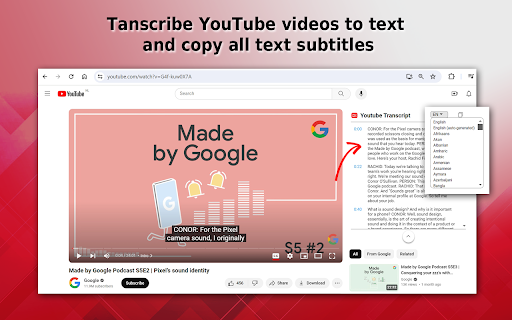
What is Youtube Transcription?
Automatically transcribes YouTube video audio into text for accessibility and search.
YouTube Transcription ai chrome extension? YouTube Transcription is a feature that automatically transcribes the audio of YouTube videos into text. This allows users to read the content of a video, making it accessible to those who are deaf or hard of hearing, or who prefer to read along with the video. It also enables users to easily search for specific keywords or phrases within a video, making it a valuable tool for research and information retrieval.
Core Features
Automatic generation of text transcripts from video audio
Synchronization of transcript with video playback
Search functionality within the transcript
Accessibility for deaf and hard-of-hearing viewers
Popular Use Cases
- Creating accessible content for viewers with hearing impairments
- Searching for specific information within a video
- Generating text summaries of video content
- Translating video content into other languages
Feature Comparison
A functional comparison based on maker input.
To be verified.
Comparison details are provided for informational purposes and should be verified with the official website.
How to use
- To use YouTube Transcription
- simply open a YouTube video and click on the 'Show transcript' button located below the video. The transcript will appear in a panel next to the video
- synchronized with the audio. You can also search within the transcript using the search bar.
Pricing
Youtube Transcription uses a freemium pricing model. Pricing and features may change over time.
Free
$0
To be verified
Pro
To be verified
To be verified
Team
To be verified
To be verified
Enterprise
To be verified
To be verified
Deal / Coupon
No coupon listed.
Why is it fantastic?
No review tags yet.
What can be improved?
No review tags yet.
Frequently Asked Questions
Verification
Tool status
To be verified
Pricing verified
To be verified
Founder claimed
No / To be verified
Source
Official website / Community submitted
Related Tags
AI WritingContent GenerationResearchEmail WritingSummarizationRewritingAcademic ResearchBrowser ExtensionFreemium
Own this tool?
Claim this profile to update product information, pricing, and official answers.