
Xpander Ai
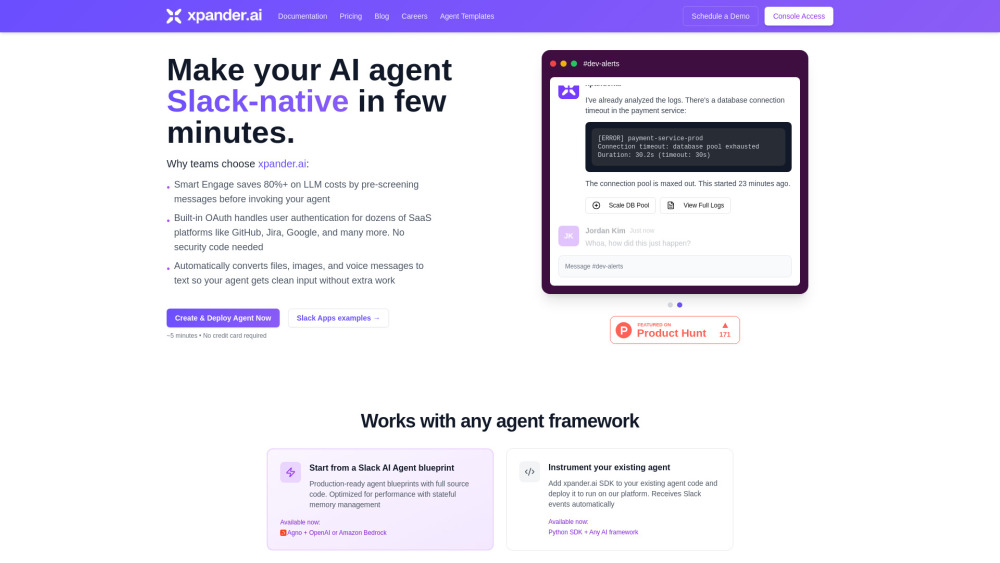
To be verifiedxpander.ai is a backend-as-a-service (BaaS) platform designed to help users deploy, manage, and scale AI agents, primarily integrating them as Slack teammates. It handles the underlying infrastructure, agent memory, tools, auto-engagement, LLM cost optimization, and user authentication, allowing AI agents to operate seamlessly within Slack workspaces without requiring users to manage complex backend systems.
BaaS for deploying and managing AI agents in Slack.
FreemiumWebsiteFree TrialPaidContact for Pricing
Overall score
—(0 reviews)
slack.xpander.ai/
What is Xpander Ai?
BaaS for deploying and managing AI agents in Slack.
xpander.ai is a backend-as-a-service (BaaS) platform designed to help users deploy, manage, and scale AI agents, primarily integrating them as Slack teammates. It handles the underlying infrastructure, agent memory, tools, auto-engagement, LLM cost optimization, and user authentication, allowing AI agents to operate seamlessly within Slack workspaces without requiring users to manage complex backend systems.
Core Features
Deploy AI Agents to Slack in minutes
Smart Engage for LLM cost optimization (saves 80%+)
Built-in OAuth for user-authenticated actions (GitHub, Jira, Google)
Automatic conversion of multimodal inputs (files, images, voice) to text
Framework-agnostic runtime (supports LangChain, CrewAI, OpenAI, Claude, etc.)
Persistent memory and thread management
Auto-scaling infrastructure and real-time monitoring
Popular Use Cases
- User-Authenticated Actions (e.g., showing open pull requests from GitHub)
- Developer Assistant (e.g., checking API errors)
- Incident Response automation
- Security Copilot functionalities
- Answering questions from documentation within Slack
Feature Comparison
A functional comparison based on maker input.
To be verified.
Comparison details are provided for informational purposes and should be verified with the official website.
How to use
- To use xpander.ai
- you follow three simple steps: 1. Create a Slack Agent by starting from a blueprint or bringing your own code
- selecting an AI framework and template. 2. Add Slack as a Task Source by connecting your deployed agent to Slack via the xpander.ai console
- configuring Slack OAuth
- and selecting the desired channels. 3. Once configured
- your agent is instantly deployed and live in your Slack workspace
- ready to receive messages and perform tasks.
Pricing
Xpander Ai uses a freemium pricing model. Pricing and features may change over time.
Free Tier
$0
Includes 50+ premium AI tools, AI Agents state management, Multiple AI Agent HMI, Bring any AI model, LLM AI gateway, 10 CRUs (Concurrent Runtime Units), 100 Agent interactions, 300 Agent actions, 1M input tokens, 100K output tokens.
Builder
Starts at $49 / month
Everything in Free Tier, plus: AI tools generator, A2A protocol, API agentic RAG, Custom agent containers, 30 CRUs, 1K Agent interactions, 3K Agent actions, 2M input tokens, 200K output tokens.
Team
Starts at $1,999 / month
Everything in Builder, plus: Environment management, Agents resource allocation, AI Agent lifecycle management, AI Agents A/B testing, Automatic AI tools generator, Connect to external logging and tracing, 120 CRUs, 60K Agent interactions, 180K Agent actions, 100M input tokens, 50M output tokens, SSO.
Custom
Custom
Everything in Team, plus: Custom worker CRUs, Custom agent interactions, Custom agent actions, Custom input tokens, Custom output tokens.
Deal / Coupon
No coupon listed.
Why is it fantastic?
No review tags yet.
What can be improved?
No review tags yet.
Frequently Asked Questions
Verification
Tool status
To be verified
Pricing verified
To be verified
Founder claimed
No / To be verified
Source
Official website / Community submitted
Related Tags
AI WritingContent GenerationResearchEmail WritingSummarizationRewritingAcademic ResearchBrowser ExtensionFreemium
Own this tool?
Claim this profile to update product information, pricing, and official answers.