
Warpdrive Browser
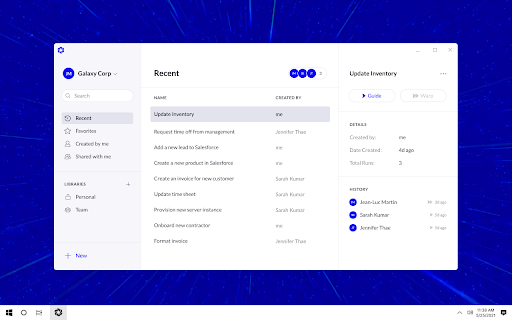
To be verifiedWarpdrive ai chrome extension? Warpdrive instantly creates desktop and browser automations by learning from a single recording of your task. The Warpdrive extension connects your Chrome browser to the Warpdrive Desktop Application. You can open websites, native applications, and do whatever you would normally do on those inputs for your task. Warpdrive is intelligent enough to generalize your task so it saves you repeated work on your desktop, or you can share with your colleagues and they can run on their machines.
Warpdrive automates desktop and browser tasks by learning from a single recording.
Browser ExtensionContact for PricingWebsiteFree
Overall score
—(0 reviews)
chromewebstore.google.com/detail/warpdrive-browser/egdcjgceamgfapabbcolhffnhdmkggah
What is Warpdrive Browser?
Warpdrive automates desktop and browser tasks by learning from a single recording.
Warpdrive ai chrome extension? Warpdrive instantly creates desktop and browser automations by learning from a single recording of your task. The Warpdrive extension connects your Chrome browser to the Warpdrive Desktop Application. You can open websites, native applications, and do whatever you would normally do on those inputs for your task. Warpdrive is intelligent enough to generalize your task so it saves you repeated work on your desktop, or you can share with your colleagues and they can run on their machines.
Core Features
Desktop and browser automation
Task recording and learning
Intelligent task generalization
Team collaboration and sharing
Popular Use Cases
- Automating repetitive data entry tasks
- Automating web scraping workflows
- Automating software testing processes
- Automating report generation
Feature Comparison
A functional comparison based on maker input.
To be verified.
Comparison details are provided for informational purposes and should be verified with the official website.
How to use
- Start a new recording by specifying a starting URL
- and optional inputs. Click record
- and let Warpdrive observe as you do the task
- which it will then immediately converts it into an intelligent automation. When you want to use the input data
- click "Use" on the panel and Ctrl+V paste it as part of your task.
Pricing
Warpdrive Browser uses a free pricing model. Pricing and features may change over time.
Free
$0
To be verified
Pro
To be verified
To be verified
Team
To be verified
To be verified
Enterprise
To be verified
To be verified
Deal / Coupon
No coupon listed.
Why is it fantastic?
No review tags yet.
What can be improved?
No review tags yet.
Frequently Asked Questions
Verification
Tool status
To be verified
Pricing verified
To be verified
Founder claimed
No / To be verified
Source
Official website / Community submitted
Related Tags
AI WritingContent GenerationResearchEmail WritingSummarizationRewritingAcademic ResearchBrowser ExtensionFreemium
Own this tool?
Claim this profile to update product information, pricing, and official answers.