
Videozen Screen And Camera Recorder
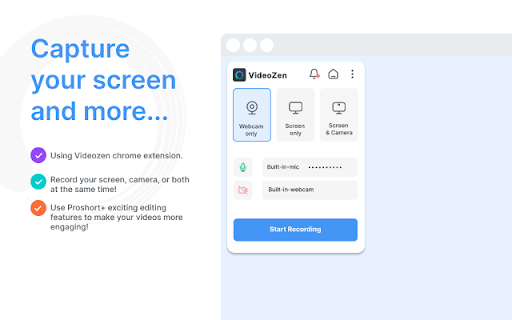
To be verifiedVideoZen ai chrome extension? VideoZen is a video creation and editing platform powered by generative AI and ChatGPT, designed for screen and camera recording in custom modes. It allows users to record their screen, current tab, or camera in HD resolution, with options to include voice via microphone or internal audio. Videos can be saved locally or to the cloud, downloaded in MP4 format, and shared instantly with a link to platforms like Jira, Slack, and GitHub. VideoZen also offers inbuilt video editing capabilities.
Video creation and editing platform with screen and camera recording, powered by AI.
Browser ExtensionContact for PricingWebsiteFree TrialPaid
Overall score
—(0 reviews)
chromewebstore.google.com/detail/videozen-screen-and-camer/fcekgnhgieggcbldnoicmempgknfolbc
What is Videozen Screen And Camera Recorder?
Video creation and editing platform with screen and camera recording, powered by AI.
VideoZen ai chrome extension? VideoZen is a video creation and editing platform powered by generative AI and ChatGPT, designed for screen and camera recording in custom modes. It allows users to record their screen, current tab, or camera in HD resolution, with options to include voice via microphone or internal audio. Videos can be saved locally or to the cloud, downloaded in MP4 format, and shared instantly with a link to platforms like Jira, Slack, and GitHub. VideoZen also offers inbuilt video editing capabilities.
Core Features
Screen and camera recording in custom modes
Inbuilt video editing capabilities
Instant sharing via link
Generative AI and ChatGPT integration
Popular Use Cases
- Record virtual meetings and discussions for future reference
- Develop comprehensive training materials
- Create compelling sales pitches
- Provide technical support through recorded sessions
- Showcase design insights with creative process recordings
- Review software applications with real-time interactions
- Offer guided tours of websites or apps
Feature Comparison
A functional comparison based on maker input.
To be verified.
Comparison details are provided for informational purposes and should be verified with the official website.
How to use
- Use VideoZen to record your screen
- a specific tab
- or your camera. Choose your desired recording settings
- including audio input. After recording
- save the video locally or to the cloud
- edit it using the inbuilt tools
- and share the generated link with others.
Pricing
Videozen Screen And Camera Recorder uses a paid pricing model. Pricing and features may change over time.
Free
$0
To be verified
Pro
To be verified
To be verified
Team
To be verified
To be verified
Enterprise
To be verified
To be verified
Deal / Coupon
No coupon listed.
Why is it fantastic?
No review tags yet.
What can be improved?
No review tags yet.
Frequently Asked Questions
Verification
Tool status
To be verified
Pricing verified
To be verified
Founder claimed
No / To be verified
Source
Official website / Community submitted
Related Tags
AI WritingContent GenerationResearchEmail WritingSummarizationRewritingAcademic ResearchBrowser ExtensionFreemium
Own this tool?
Claim this profile to update product information, pricing, and official answers.