
Read Something
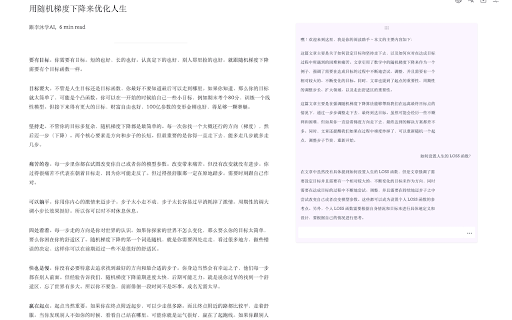
To be verifiedRead Something ai chrome extension? Read Something is an AI-powered, open-source Chrome extension designed to enhance web reading. It offers customizable reader modes, AI-generated discussions, translation across multiple languages (Chinese, English, etc.), and webpage export to Markdown format. It simplifies the reading experience by providing tools similar to Safari's reader mode, allowing users to adjust font styles, line spacing, and page width for comfortable reading. Additionally, it includes features like AI summaries, interactive Q&A, and support for Google Translate, Tencent Translate, and OpenAI Translate.
AI-powered Chrome extension for enhanced web reading with reader mode, AI summaries, and translation.
Browser ExtensionFreemiumFreeAppFree Trial
Overall score
—(0 reviews)
chrome.google.com/webstore/detail/read-something/bcagnbmncmeliaknnhmbkkgackfipoic/related
What is Read Something?
AI-powered Chrome extension for enhanced web reading with reader mode, AI summaries, and translation.
Read Something ai chrome extension? Read Something is an AI-powered, open-source Chrome extension designed to enhance web reading. It offers customizable reader modes, AI-generated discussions, translation across multiple languages (Chinese, English, etc.), and webpage export to Markdown format. It simplifies the reading experience by providing tools similar to Safari's reader mode, allowing users to adjust font styles, line spacing, and page width for comfortable reading. Additionally, it includes features like AI summaries, interactive Q&A, and support for Google Translate, Tencent Translate, and OpenAI Translate.
Core Features
Customizable reader mode
AI-generated text summaries and interactive Q&A
Translation support (Google, Tencent, OpenAI)
Markdown export
Popular Use Cases
- Enhance reading experience by adjusting font styles and spacing.
- Generate summaries of articles for quick understanding.
- Translate webpages for reading in different languages.
- Save articles in Markdown format for offline access.
Feature Comparison
A functional comparison based on maker input.
To be verified.
Comparison details are provided for informational purposes and should be verified with the official website.
How to use
- Install the Read Something Chrome extension from the Chrome Web Store. Once installed
- activate the extension on any webpage to enable reader mode
- AI summarization
- translation
- or Markdown export features.
Pricing
Read Something uses a freemium pricing model. Pricing and features may change over time.
Free
$0
To be verified
Pro
To be verified
To be verified
Team
To be verified
To be verified
Enterprise
To be verified
To be verified
Deal / Coupon
No coupon listed.
Why is it fantastic?
No review tags yet.
What can be improved?
No review tags yet.
Frequently Asked Questions
Verification
Tool status
To be verified
Pricing verified
To be verified
Founder claimed
No / To be verified
Source
Official website / Community submitted
Related Tags
AI WritingContent GenerationResearchEmail WritingSummarizationRewritingAcademic ResearchBrowser ExtensionFreemium
Own this tool?
Claim this profile to update product information, pricing, and official answers.