
Ocr Text Recognition
To be verifiedPDFgear ai chrome extension? PDFgear is a free, all-in-one PDF software designed to handle a wide range of PDF-related tasks. It allows users to view, edit, convert, sign, compress, and organize PDF files without any cost. PDFgear supports various platforms, including Windows, Mac, iOS, and online, making it accessible across different devices. It offers features like PDF editing, conversion to and from various formats (Word, Excel, PowerPoint, images), PDF merging and splitting, PDF compression, and PDF signing. PDFgear aims to provide a comprehensive and user-friendly solution for managing PDF documents efficiently.
Free all-in-one PDF software for viewing, editing, converting, and managing PDF files.
Browser ExtensionFreeWebsitePaidApp
Overall score
—(0 reviews)
chromewebstore.google.com/detail/ocr-text-recognition/oldinjmajkejmhnnllhcaopbbfdlepgd
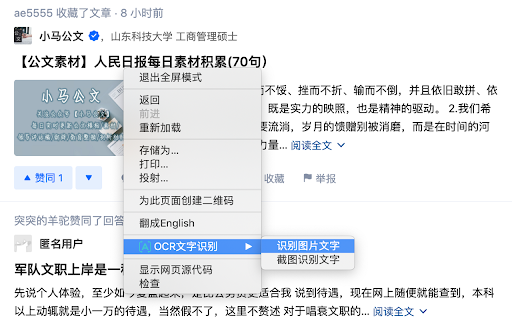
What is Ocr Text Recognition?
Free all-in-one PDF software for viewing, editing, converting, and managing PDF files.
PDFgear ai chrome extension? PDFgear is a free, all-in-one PDF software designed to handle a wide range of PDF-related tasks. It allows users to view, edit, convert, sign, compress, and organize PDF files without any cost. PDFgear supports various platforms, including Windows, Mac, iOS, and online, making it accessible across different devices. It offers features like PDF editing, conversion to and from various formats (Word, Excel, PowerPoint, images), PDF merging and splitting, PDF compression, and PDF signing. PDFgear aims to provide a comprehensive and user-friendly solution for managing PDF documents efficiently.
Core Features
PDF Viewing
PDF Editing
PDF Conversion (to/from Word, Excel, PowerPoint, Images)
PDF Merging and Splitting
PDF Compression
PDF Signing
Popular Use Cases
- Editing PDF documents to correct errors or add information.
- Converting PDF files to Word, Excel, or PowerPoint for easier editing.
- Merging multiple PDF files into a single document.
- Splitting a large PDF file into smaller, more manageable files.
- Compressing PDF files to reduce their size for easier sharing.
- Adding digital signatures to PDF documents for authentication.
Feature Comparison
A functional comparison based on maker input.
To be verified.
Comparison details are provided for informational purposes and should be verified with the official website.
How to use
- To use PDFgear
- simply download and install the software on your device or access the online version. You can then open a PDF file and use the various tools available to edit
- convert
- sign
- or compress the document as needed. The interface is designed to be intuitive
- making it easy for users to navigate and perform different tasks.
Pricing
Ocr Text Recognition uses a freemium pricing model. Pricing and features may change over time.
Free
$0
To be verified
Pro
To be verified
To be verified
Team
To be verified
To be verified
Enterprise
To be verified
To be verified
Deal / Coupon
No coupon listed.
Why is it fantastic?
No review tags yet.
What can be improved?
No review tags yet.
Frequently Asked Questions
Verification
Tool status
To be verified
Pricing verified
To be verified
Founder claimed
No / To be verified
Source
Official website / Community submitted
Related Tags
AI WritingContent GenerationResearchEmail WritingSummarizationRewritingAcademic ResearchBrowser ExtensionFreemium
Own this tool?
Claim this profile to update product information, pricing, and official answers.