
My Ears
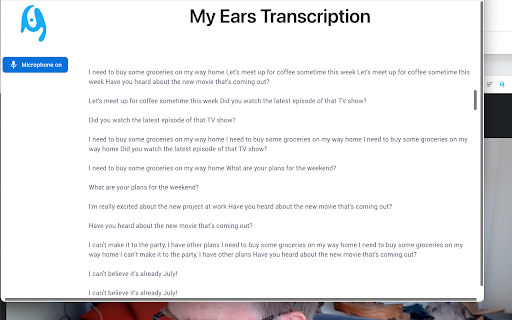
To be verifiedPrivacy Sensitive Audio Transcription Tool ai chrome extension? This extension is a privacy-sensitive audio transcription tool that generates text from speech audio within a Chrome tab. It can optionally include the local microphone for transcribing two-way conversations. Crucially, it does not send any source audio or transcripts to external services, ensuring user data sovereignty by running the transcription engine within a WASM module in the browser.
Privacy-focused audio transcription tool that operates locally within the browser.
Browser ExtensionFreeWebsiteFreemiumFree Trial
Overall score
—(0 reviews)
chromewebstore.google.com/detail/my-ears/kaeognoofcpoipiinljgjcoohaccimpg
What is My Ears?
Privacy-focused audio transcription tool that operates locally within the browser.
Privacy Sensitive Audio Transcription Tool ai chrome extension? This extension is a privacy-sensitive audio transcription tool that generates text from speech audio within a Chrome tab. It can optionally include the local microphone for transcribing two-way conversations. Crucially, it does not send any source audio or transcripts to external services, ensuring user data sovereignty by running the transcription engine within a WASM module in the browser.
Core Features
Privacy-sensitive audio transcription
Local processing within the browser (WASM module)
Transcription of audio from Chrome tabs
Optional microphone input for two-way conversation transcription
No data sent to external services
Popular Use Cases
- Transcribing online meetings or webinars
- Creating transcripts of personal conversations
- Generating text from audio content playing in a browser tab
- Providing accessibility for users with hearing impairments
Feature Comparison
A functional comparison based on maker input.
To be verified.
Comparison details are provided for informational purposes and should be verified with the official website.
How to use
- The extension transcribes audio from a Chrome tab or the local microphone directly within the browser. Simply activate the extension
- and it will begin converting audio to text. No external services are used.
Pricing
My Ears uses a freemium pricing model. Pricing and features may change over time.
Free
$0
To be verified
Pro
To be verified
To be verified
Team
To be verified
To be verified
Enterprise
To be verified
To be verified
Deal / Coupon
No coupon listed.
Why is it fantastic?
No review tags yet.
What can be improved?
No review tags yet.
Frequently Asked Questions
Verification
Tool status
To be verified
Pricing verified
To be verified
Founder claimed
No / To be verified
Source
Official website / Community submitted
Related Tags
AI WritingContent GenerationResearchEmail WritingSummarizationRewritingAcademic ResearchBrowser ExtensionFreemium
Own this tool?
Claim this profile to update product information, pricing, and official answers.