
Briefly Ai Meeting Summary Email Follow Up
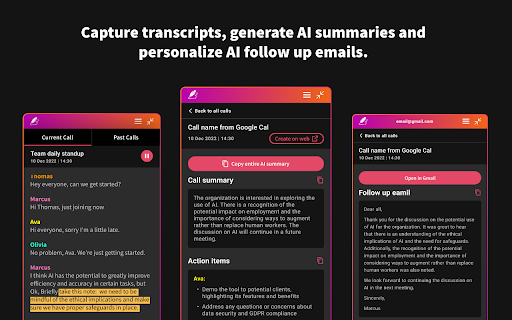
To be verifiedBriefly ai chrome extension? Briefly is a browser extension designed to capture meeting notes, transcribe conversations, summarize key points, and gather insights without causing distractions. It helps users stay focused during meetings by automating note-taking and providing tools to organize thoughts. Briefly also streamlines post-meeting workflows by generating summaries, action items, and follow-up emails, and transforming conversations into project documents like product requirements, marketing briefs, and investment memos. It integrates with platforms like Slack to update CRM systems with meeting summaries and insights.
Briefly automates meeting notes, transcriptions, summaries, and follow-ups to enhance productivity.
Browser ExtensionFreemiumFree TrialWebsiteFree
Overall score
—(0 reviews)
chromewebstore.google.com/detail/briefly-ai-meeting-summar/bjmgcelbpkgmofiogkmleblcmecflldk
What is Briefly Ai Meeting Summary Email Follow Up?
Briefly automates meeting notes, transcriptions, summaries, and follow-ups to enhance productivity.
Briefly ai chrome extension? Briefly is a browser extension designed to capture meeting notes, transcribe conversations, summarize key points, and gather insights without causing distractions. It helps users stay focused during meetings by automating note-taking and providing tools to organize thoughts. Briefly also streamlines post-meeting workflows by generating summaries, action items, and follow-up emails, and transforming conversations into project documents like product requirements, marketing briefs, and investment memos. It integrates with platforms like Slack to update CRM systems with meeting summaries and insights.
Core Features
Meeting transcription and categorization
AI-generated summaries and key insights
Personalized action items
Automated follow-up email composition
Project document creation from transcripts
Integration with platforms like Slack
Popular Use Cases
- Generating meeting summaries and action items
- Crafting follow-up emails after meetings
- Creating project documents from meeting transcripts (e.g., product requirements, marketing briefs)
- Updating CRM systems with meeting insights
Feature Comparison
A functional comparison based on maker input.
To be verified.
Comparison details are provided for informational purposes and should be verified with the official website.
How to use
- To use Briefly
- install the Chrome Extension
- sign in with Google
- start a Google Meet
- and click 'Start transcribing this meeting' under Current Call. After the call
- open the Briefly extension to view transcripts and AI summaries. Use the AI follow-up tab to edit and send follow-up emails from your Gmail inbox. Access the dashboard for more features via the 'Create on web' button or the provided URL.
Pricing
Briefly Ai Meeting Summary Email Follow Up uses a freemium pricing model. Pricing and features may change over time.
Free
$0
To be verified
Pro
To be verified
To be verified
Team
To be verified
To be verified
Enterprise
To be verified
To be verified
Deal / Coupon
No coupon listed.
Why is it fantastic?
No review tags yet.
What can be improved?
No review tags yet.
Frequently Asked Questions
Verification
Tool status
To be verified
Pricing verified
To be verified
Founder claimed
No / To be verified
Source
Official website / Community submitted
Related Tags
AI WritingContent GenerationResearchEmail WritingSummarizationRewritingAcademic ResearchBrowser ExtensionFreemium
Own this tool?
Claim this profile to update product information, pricing, and official answers.