DocsToAudio

A verifier
A verifier
Convert EPUB, PDF, DOCX & TXT to MP3 or M4B audiobooks. Free tier: 300+ voices, no sign-up, no size limits. Premium tier: 800+ ElevenLabs AI voices. No subscriptions.
WebsiteFreemiumFree TrialBrowser ExtensionFree
Visiter le site
Score global
(0 avis)
docstoaudio.online/
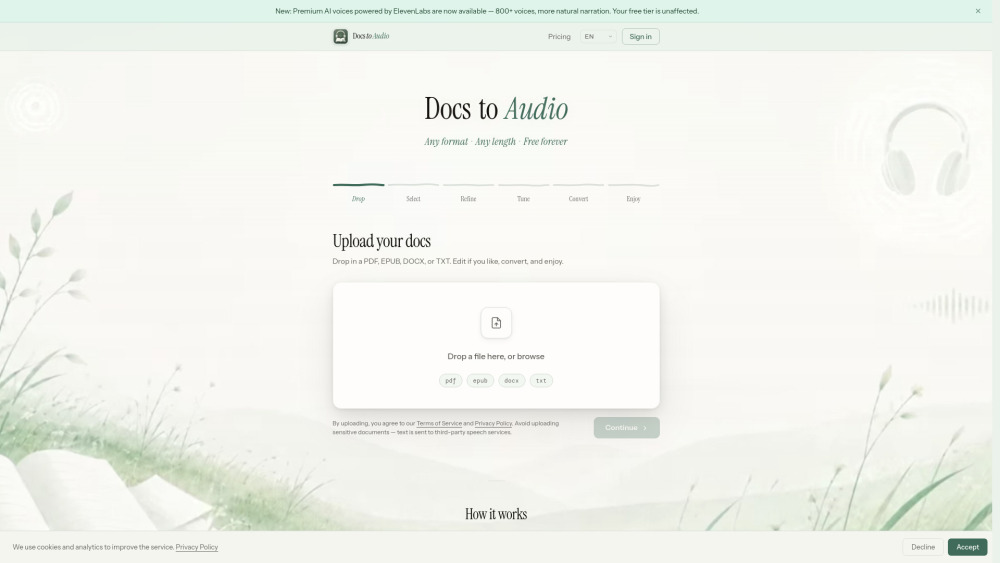
DocsToAudio website screenshot
Qu'est-ce que DocsToAudio ?

DocsToAudio is an online document-to-audiobook converter that turns your EPUB, PDF, DOCX, and TXT files into downloadable MP3 or M4B audiobooks. The **Standard tier** is completely free, requires no account, and imposes no file size limits. It offers 300+ voices across 30+ languages, so you can listen to any document in your preferred language and voice. The **Premium tier** unlocks 800+ ElevenLabs AI voices across 50+ languages for more expressive, human-like narration. Premium uses a pay-as-you-go credit system — no subscription, no recurring fees. You can preview any voice before committing to a conversion.

Convert EPUB, PDF, DOCX & TXT to MP3 or M4B audiobooks. Free tier: 300+ voices, no sign-up, no size limits. Premium tier: 800+ ElevenLabs AI voices. No subscriptions.

Fonctionnalites principales
Convert PDF, EPUB, DOCX, and TXT files to MP3 or M4B audiobooks
Standard tier: 300+ voices, 30+ languages, completely free, no account required
Premium tier: 800+ ElevenLabs AI voices, 50+ languages, pay-as-you-go credits
Chapter-level selection with word count and estimated listening time
Text preview and editing before conversion
Voice preview before committing to a conversion
No file size limits
Download as individual MP3 files (ZIP) or single M4B with chapter marks
Resume interrupted conversions
Cas d'usage populaires
  • Turn eBooks or PDFs into audiobooks for commuting or exercising
  • Convert study materials
  • research papers
  • or textbooks into audio for passive learning
  • Listen to long DOCX reports or TXT documents hands-free
  • Create narrated audio versions of blog posts or articles saved as PDF
  • Produce accessible audio content from documents for people with visual impairments
  • Batch-convert book chapters into podcast-ready MP3 files
Feature Comparison
A functional comparison based on maker input.
A verifier
Comparison details are provided for informational purposes and should be verified with the official website.
Comment l'utiliser
  • 1. Go to **https://docstoaudio.online** — no sign-up needed for the free tier. 2. Drag and drop or browse to upload your PDF
  • EPUB
  • DOCX
  • or TXT file. 3. Select the chapters you want to convert. 4. (Optional) Preview and edit the extracted text. 5. Choose a voice. Click **Generate Preview** to hear a sample. 6. Click **Convert** and keep the tab open while it processes. 7. When done
  • download your audiobook as a ZIP of MP3 files or a single M4B file. For the **Premium tier**: sign in with Google or email
  • purchase credits from your Account page
  • then select any ElevenLabs voice in the voice picker.

Tarifs
DocsToAudio utilise un modele tarifaire Freemium. Les prix et fonctionnalites peuvent evoluer avec le temps.
Standard
Free
300+ voices, 30+ languages, unlimited conversions, no account required, no hidden fees — ever
Premium
From $15 (pay-as-you-go credits)
800+ ElevenLabs AI voices, 50+ languages, more natural narration, credits valid for 1 year, no subscription
Offre / Coupon
Aucun coupon liste.
Pourquoi les utilisateurs l'aiment ?
Aucun tag d'avis pour le moment.
Que peut-on ameliorer ?
Aucun tag d'avis pour le moment.
Questions frequentes

Verification
Tool status
A verifier
Pricing verified
A verifier
Founder claimed
No / To be verified
Source
Official website / Community submitted
Related Tags
AI WritingContent GenerationResearchEmail WritingSummarizationRewritingAcademic ResearchBrowser ExtensionFreemium
Own this tool?
Claim this profile to update product information, pricing, and official answers.